SmartRewards: Cumberland Farms
- 4.2
- Rating
- 1.00M
- Installs
- Free
- Price
 Analysis by App-foxy
I approached SmartRewards by EG America as a practical shopping companion rather than as a general-purpose lifestyle app. Its purpose is straightforward: help Cumberland Farms customers find discounts, savings, and rewards while they are buying fuel, snacks, drinks, or everyday essentials. That narrow focus is also its biggest strength. When I am already stopping at a Cumberland Farms location, having the store’s loyalty tools in one place is more useful than switching between paper offers, a wallet full of cards, and a separate notes app.
The app is free, aimed at Everyone, and belongs to the lifestyle category. It has been around since March 30, 2012, which gives it a long track record compared with many newer loyalty tools. Its current average is 4.2 from roughly 34 thousand ratings, with more than a million installs. Those figures suggest that it has become a familiar part of the Cumberland Farms routine, although popularity alone does not make every interaction effortless.
How SmartRewards feels in everyday use
I find SmartRewards most useful when I treat it as a quick pre-visit check rather than something to explore while I’m in line. That small change can make a loyalty app feel less like another checkout task and more like a reminder to make an informed choice. It also sets up the practical question: what can I do before I arrive to keep the actual stop simple?
You May Also Like

 Blood Strike: 2.5 Anniversary
Blood Strike’s Loadouts Turn Every Drop Into a Tactical Gamble
A close look at Blood Strike’s custom loadouts: how fast access to signature weapons reshapes its battle royale rhythm, rewards preparation, and narrows the gap between fights.

 Pandora - Music & Podcasts
Pandora’s Music Is Easy to Start, but Harder to Recover
Pandora’s strength is its low-effort path from a seed to a station. Its weak spot is how much confidence it asks you to place in connection, setup, and quiet recovery.

 8 Ball Pool
 Is Built on Rivalries, Rematches, and Routine
A close look at the rivalries, rematches, shared routines, and unanswered safety questions that turn a quick pool match into a persistent mobile community.

 Samsung Music
’s Quiet Strength Is Playing What You Already Own
Its reach comes less from spectacle than from dependable access to a personal library. That simplicity is both the app’s strongest retention engine and its ceiling.

 AccuWeather: Weather Radar
AccuWeather Review: A Quick, Clear Forecast for Everyday Decisions
For everyday plans, the best forecast is the one you can understand quickly. AccuWeather makes rain timing, radar, and local conditions easy to act on, with a few trade-offs.

 Hill Climb Racing
Why Hill Climb Racing Still Turns Crashes Into One More Run
A tiny car, a bumpy hill and one more upgrade: Hill Climb Racing keeps resurfacing because its simple chaos makes every near-miss feel personal.
More From Our News Desk



Readable screens and a navigation style that rewards preparation
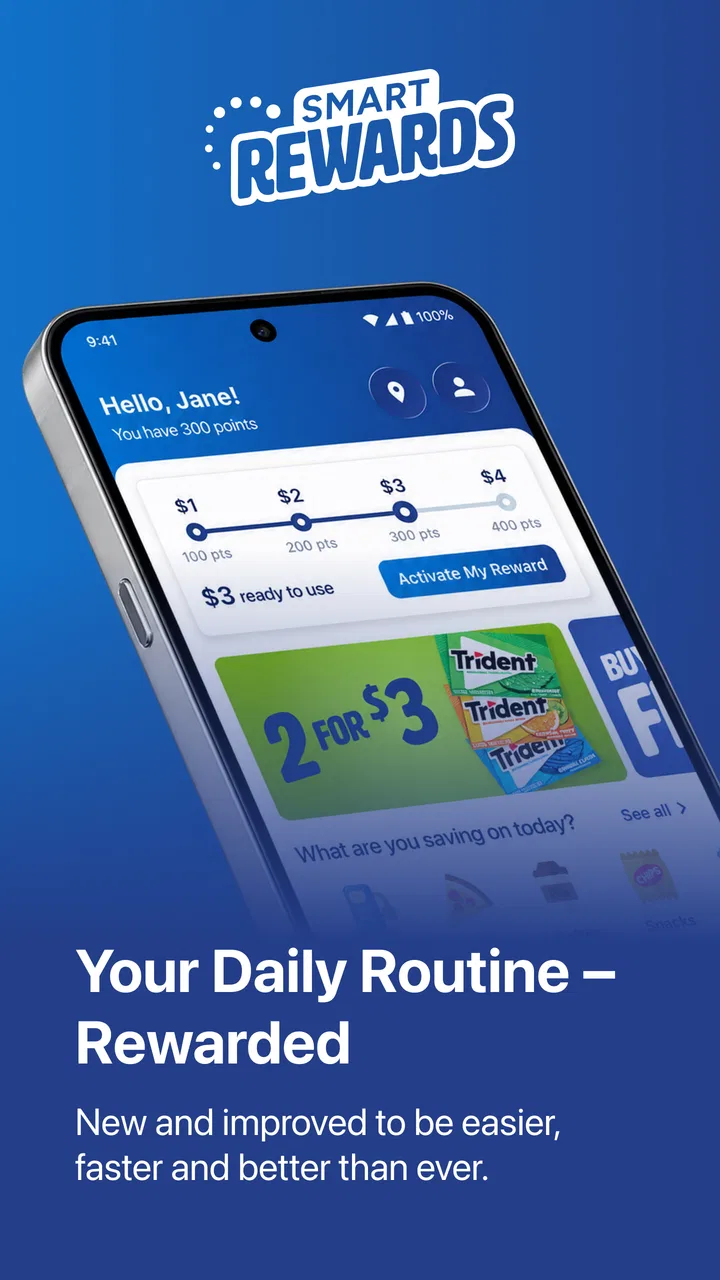
My first impression is that SmartRewards makes the most sense when I open it before reaching the checkout. The central idea is not to browse endlessly; it is to check what savings or reward activity is relevant, then use that information during the visit. That workflow matters for people who find rushed decisions difficult. Looking at the app while parked, before entering the store, gives me time to read the available information and decide whether I want to use it.
The app’s role as a Cumberland Farms loyalty tool should also make its navigation easier to understand than a broad coupon marketplace. I am not searching through offers from unrelated retailers. I am using an app connected to one familiar store environment, so the mental model is relatively simple: open it, inspect the current savings or rewards, and use the relevant option during a purchase. For someone who visits Cumberland Farms regularly, that consistency can reduce the learning curve.
Still, a loyalty app is only helpful if the important action is easy to identify. I would not rely on it for the first time while standing in a busy checkout line. Bright lighting, background noise, other customers waiting, and the pressure to move quickly can make even a simple screen feel demanding. My practical advice is to explore the account and reward areas at home, then use the app at the store only for the final confirmation or redemption step.
The most useful accessibility habit is to separate discovery from checkout. Browse offers and understand the reward status when you have time. At the register, you should already know what you are trying to use. This is particularly helpful if you read slowly, use enlarged text, need more time to process information, or simply dislike making decisions under pressure.
SmartRewards is also more approachable when I treat it as a single-purpose tool instead of expecting it to replace every shopping app. It is not the right place for comparing prices across several chains or managing loyalty programs from different retailers. Its value comes from keeping Cumberland Farms savings and rewards close at hand. That limitation makes the experience less cluttered, but it also means the app is worthwhile mainly for people who actually use the chain.
Motor, visual, and sensory factors to consider
From an inclusive-use perspective, the important question is not only whether I can open the app, but whether I can complete the whole process without precise timing or repeated tapping. Loyalty tasks often happen with one hand while I carry a drink, hold a wallet, or stand beside a vehicle. That context can turn small controls, short-lived screens, or an unclear confirmation into real friction.
I found the safest approach was to prepare before handling the purchase. If I am fueling or buying several items, I do not want to search through the app while also managing a phone, payment method, and physical goods. People with limited dexterity may especially benefit from opening the relevant reward information before approaching the counter. It reduces the number of gestures needed when the phone is being held at an awkward angle.
For users with low vision, readability depends on more than the words themselves. Screen brightness, contrast, text size, and the amount of information shown at once all affect whether an offer can be understood quickly. I would use the phone’s own display and text settings where available, but I would not assume that every part of a third-party app will respond perfectly to those adjustments. A person who needs very large text or strong visual separation should test the key reward screen before depending on it during a purchase.
Users with color-vision differences should also avoid relying on color alone when deciding whether a reward is ready or active. The safer practice is to read the accompanying wording and look for a clear state change, rather than interpreting a green, red, or highlighted area by itself. That is a general caution for this kind of interface, not a claim that a particular color system is used everywhere in SmartRewards.
For people sensitive to motion, sound, or visual clutter, the best experience will probably come from limiting unnecessary browsing. Open the app, go directly to the section you need, and close it after confirming the information. A busy retail environment already supplies plenty of sensory input. The app works better as a quick reference than as something I would casually explore while standing in line.
One non-obvious trade-off is that a digital reward can reduce the need to carry a physical loyalty card, but it transfers responsibility to the phone. The phone must be charged, unlocked, readable, and usable at the exact moment of purchase. For someone with tremors, hand pain, or difficulty holding a phone steady, a physical backup payment or loyalty method may be more dependable. SmartRewards is convenient, but convenience is not the same as universal ease.
Why context changes the experience
The same app can feel simple in a quiet kitchen and difficult at a crowded Cumberland Farms counter. In my experience, the most realistic scenario is a short stop after work: I park, check the current reward information before going inside, decide what I need, and keep the phone ready only if the purchase requires it. That sequence avoids trying to read small details while people are waiting behind me.
Another useful situation is a planned fuel stop. If I already know I am visiting Cumberland Farms, checking SmartRewards before leaving can help me remember to use the available savings instead of discovering them after the transaction. This is where the app is more useful than a generic coupon folder: the information is tied to the retailer I am about to visit, so there is less irrelevant material to sort through.
For a caregiver or family member helping someone else shop, preparation can make the app less stressful. One person can review the reward information in advance, explain the intended action, and leave the shopper with only a simple step at the store. That does not remove every barrier, but it reduces the need to navigate while managing conversation, mobility, or a shopping list.
People who use screen readers or other assistive technologies should approach the app with a short test rather than assuming every control will be equally accessible. The essential check is practical: can the user move through the main reward information, understand what is available, and complete the intended action without needing visual confirmation from another person? If that workflow is reliable on the user’s device, SmartRewards can fit into an assistive setup. If a critical button or status is not exposed clearly, the app may be frustrating even though the overall purpose is simple.
Situational access also includes connectivity and attention. I would not wait until the final second to open the app, especially in a location where the phone signal or store environment may be unpredictable. Reviewing the relevant details ahead of time is a sensible safeguard. It also helps users who experience anxiety in queues, because the decision has already been made before the transaction begins.
Where the convenience can turn into a barrier
The largest limitation is dependence on a phone-based workflow. A person who does not carry a smartphone, shares a device, has limited data access, or prefers not to use digital loyalty programs may find that SmartRewards is simply not a good match. The app cannot make a retailer’s rewards system inclusive for someone who is excluded from the required device or process.
There is also a memory burden. It is easy to download a rewards app and then forget to open it before shopping. If I only remember after paying, the benefit may be less useful than expected. I recommend creating a personal routine: check it before leaving for a Cumberland Farms stop, not after arriving at the register. This small change is more valuable than repeatedly searching for savings at the last moment.
Another barrier is divided attention. A customer may be watching children, carrying groceries, navigating a mobility aid, or trying to hear a cashier in a noisy store. In those circumstances, even a well-organized app adds another task. SmartRewards is not the right choice when using it would make the purchase less safe or less manageable. I would prioritize the transaction and use a simpler alternative when available.
Privacy preferences can influence the decision as well. Some people are comfortable using a retailer-specific rewards app, while others prefer cash, a standard payment card, or occasional paper promotions because they want fewer digital accounts. SmartRewards is designed for customers who see value in a connected loyalty experience. It is not automatically better for someone whose main priority is minimizing apps and sign-ins.
Compared with paper coupons, the app is easier to keep with me and harder to leave at home, but it requires a working phone and a moment of preparation. Compared with a generic coupon app, it should be less distracting because it is focused on Cumberland Farms rather than many unrelated stores. Compared with using no rewards tool at all, it offers a more organized way to look for savings, but only if I remember to use it consistently. These are meaningful differences, not reasons to choose it blindly.
I would also avoid judging the experience solely by the headline promise of discounts. The real value depends on how often I visit Cumberland Farms and whether the available rewards fit what I normally buy. A frequent customer can benefit from building the app into a regular stop. Someone who visits only occasionally may find that the preparation, account management, and phone dependence outweigh the savings.
Who should use it, and who should skip it
I would recommend SmartRewards to regular Cumberland Farms customers who want one place for store-related discounts and rewards. It is especially practical for people who already use their phone while shopping and are willing to check the app before entering the store. The free price removes an obvious financial barrier, and the Everyone age rating makes it suitable for a broad household audience.
It can also suit people who prefer predictable routines. If your usual trip follows the same pattern—check the app, shop, and complete the purchase—the app can become a small but useful part of that routine. The strongest benefit is not constant browsing; it is reducing the chance that you forget a reward during a planned visit.
I would be more cautious about recommending it to someone who rarely visits Cumberland Farms, dislikes retailer apps, needs very large or highly customized interface elements, or cannot comfortably operate a phone at checkout. Those users may be better served by a simpler payment method, a physical loyalty option if one is available to them, or asking a trusted companion to handle the digital step. SmartRewards should support the shopping trip, not make it harder.
For families, I would decide based on who controls the account and who actually shops. Sharing a phone informally can create confusion if one person expects another to remember the reward process. A clearer arrangement is to have the regular shopper review the app and keep the process consistent. That is a small organizational detail, but it prevents the common problem of having a reward app that nobody feels responsible for using.
My inclusive verdict after using it
SmartRewards by EG America is a focused lifestyle app with a clear everyday purpose: connect Cumberland Farms shopping with discounts, savings, and rewards. I like that its usefulness is easy to understand, and its long presence since 2012, free availability, Everyone rating, and broad adoption show why it remains relevant to many customers. Its 4.2 average from about 34 thousand ratings gives it a solid public reception, while the more than one million installs indicate that it is not a niche experiment.
Its accessibility story is more practical than transformative. The app can fit many users’ routines when they prepare in advance, use device-level display settings, and avoid trying to navigate during a rushed checkout. It may work well for people who need a digital alternative to carrying a loyalty card, and it can be helpful for caregivers who want to organize the reward step before a shopping trip.
At the same time, I would not call it universally effortless. Phone dependence, divided attention, uncertain readability for users with specific visual needs, and the pressure of a busy store can all create barriers. The most inclusive approach is to treat SmartRewards as an optional aid, keep a backup plan, and test the exact shopping workflow before relying on it.
My recommendation is therefore conditional but positive: if Cumberland Farms is part of your regular routine, install it, explore it in a calm setting, and make checking it before a visit a habit. If you rarely shop there or find digital loyalty systems tiring, the app may not earn a place on your phone. For the right user, it turns a familiar stop into a more organized one; for everyone else, the usual payment or coupon alternative may be simpler.
FAQs for SmartRewards: Cumberland Farms
01What is SmartRewards by EG America?
SmartRewards by EG America is a loyalty app designed to enhance your shopping experience at EG America locations. It allows users to earn points on purchases, access exclusive deals, and redeem rewards. The app is available for both Android and iOS devices, making it convenient for all users.
02How do I earn points with SmartRewards?
You can earn points by making purchases at participating EG America locations and scanning your app at checkout. Points accumulate with every eligible purchase, and you can track your progress directly within the app. Additionally, special promotions may offer bonus points for certain products or activities.
03What kind of rewards can I redeem with my points?
With SmartRewards, you can redeem points for a variety of rewards, such as discounts on future purchases, free products, and exclusive offers. The app regularly updates its reward catalog, ensuring that there are always new and exciting options for users to choose from.
04Is SmartRewards free to download and use?
Yes, the SmartRewards app is free to download and use. There are no hidden fees or subscription costs associated with joining the program. Simply download the app from the Google Play Store or Apple App Store, create an account, and start earning rewards right away.
05What should I do if I encounter issues with the app?
If you experience any issues with the SmartRewards app, you can contact their customer support through the app or via their website. They provide assistance for common problems such as login issues, reward redemption, and point discrepancies. It’s recommended to keep your app updated to avoid potential technical issues.
Pros
- User-friendly interface for easy navigation.
- Offers a wide range of rewards options.
- Quick and seamless redemption process.
- Regular updates with new reward deals.
- Loyalty points accumulate quickly.
Cons
- Requires stable internet for full functionality.
- Limited to EG America locations.
- Occasional app crashes reported.
- Registration process can be lengthy.
- Notifications can be overwhelming.

SmartRewards: Cumberland Farms
Gallery